

A new website should bring more traffic, not less. Yet one of the most common emails an SEO receives goes like this: “We launched the new site two weeks ago and our leads have dropped by half.”
It almost always comes down to the same few causes: URLs that changed without redirects, pages that were removed, content that was cut, or a staging setting that went live by mistake.
Every one of them is preventable. This checklist shows you how to plan, launch and monitor a redesign so you keep the rankings you already earned.
Quick answer: how do you redesign a website without losing SEO?
To redesign a website without losing SEO, crawl and benchmark the old site, keep the URLs that already rank whenever possible, map every old URL to its new equivalent with 301 redirects, keep the content and internal links of top pages, check the staging site before launch, and monitor Search Console, rankings and conversions daily for the first weeks after launch.
Redesign vs. migration: what’s actually changing?
Not every redesign carries the same risk. The more you change, the more careful you need to be.
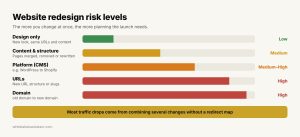
Website redesign risk levels
| Change | Example | SEO risk |
| Design only | New look, same URLs and content | Low |
| Content and structure | Pages merged, removed or rewritten | Medium |
| Platform (CMS) | WordPress to Webflow or Shopify | Medium to high |
| URLs | New URL structure or slugs | High |
| Domain | olddomain.com to newdomain.com | High |
Many redesigns combine several of these at once. That’s when traffic drops are most likely, and most worth planning for.
The 7-step SEO migration checklist
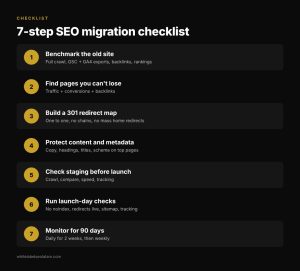
7-step SEO migration checklist for a website redesign
1. Benchmark the old site before anything changes
You can’t prove nothing was lost if you don’t know what you had. Before the redesign starts:
- Crawl the full site with a tool like Screaming Frog and save the list of every URL, title, meta description, H1 and canonical.
- Export performance data: the top pages and queries from Google Search Console and the top landing pages and conversions from GA4, covering at least the last 12 months.
- Export your backlinks so you know which pages other sites link to.
- Record current rankings for your most important keywords.
2. Identify the pages you can’t afford to lose
Combine traffic, conversions and backlinks into one list. The pages at the top of that list need the most protection: keep their URLs if you can, keep their content, and keep them linked from the main navigation.
3. Build a URL redirect map
Every old URL that changes needs a permanent (301) redirect to the most relevant new page. Google’s guide to site moves with URL changes recommends server-side permanent redirects and keeping them in place for at least a year.
- Redirect one to one whenever possible: old service page to new service page.
- Avoid sending everything to the home page. Google may treat mass redirects to the home page like soft 404s.
- Avoid chains. Old URL to new URL in one step, not three.
- Update internal links so they point to the final URL, not to a redirect.
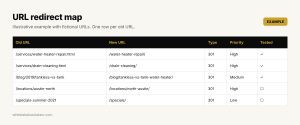
Illustrative example: URL redirect map
Illustrative example with fictional URLs. Keep the map in a spreadsheet the developer and the SEO both work from.
4. Protect content, metadata and structured data
Design teams love to trim text. Search engines don’t. For your top pages, keep the core content, headings, title tags, meta descriptions and structured data, or improve them. If a page is getting shorter, make sure the answers searchers came for are still there.
5. Check the staging site before launch
Run a crawl of the staging site and compare it to the old one. Look for:
- Missing pages and broken internal links.
- Titles, H1s and canonicals that changed by mistake.
- Page speed and Core Web Vitals on mobile.
- Analytics and tag manager tracking on every template.
Keep staging blocked from search engines with password protection, and make a note to remove any noindex tags at launch.
6. Launch-day checks
On launch day, check the things that cause the biggest losses:
- No sitewide noindex and no robots.txt rule blocking the site. This is the most common, and most expensive, launch mistake.
- Redirects work. Test a sample of old URLs, starting with your top pages.
- The new XML sitemap is live and submitted in Search Console.
- Tracking works: GA4 events, key events and call tracking are firing.
- For domain changes, use the Change of Address tool in Search Console.
7. Monitor for 90 days
Some movement after launch is normal while Google recrawls the site. Watch daily for the first two weeks, then weekly:
- Search Console: indexing, coverage errors, 404s and performance by page.
- Rankings for your priority keywords.
- Organic leads and conversions in GA4.
- Redirect errors and new broken links in a weekly crawl.
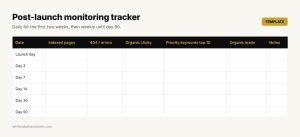
Post-launch SEO monitoring tracker template
If a key page drops and stays down after two or three weeks, compare it with the old version: content, internal links and redirects usually explain the difference.
Common redesign mistakes that cost rankings
- Forgetting redirects for old blog posts and images. They often carry backlinks.
- Launching with the staging noindex still in place.
- Merging pages without merging content. The new page loses the answers that ranked.
- Changing URLs for style alone. If a URL ranks, keep it.
- Launching right before your busy season. Give the site time to settle.
When it makes sense to get help
Web design agencies are great at building beautiful sites, but SEO migrations need a different set of checks, and a single missed step can wipe out months of a client’s traffic. Many design agencies partner with a private label SEO team that handles the crawl, redirect map, launch checks and monitoring under the agency’s brand, so every redesign launches safely without hiring an SEO specialist in-house.
Whoever does the work, the rule is simple: never launch a redesign without a benchmark, a redirect map and a plan to monitor it.
FAQ
Will a website redesign hurt my SEO?
It doesn’t have to. Most traffic drops after a redesign come from missing redirects, removed content or launch mistakes, all of which can be prevented with a migration plan.
How long does it take to recover rankings after a redesign?
With proper redirects, small fluctuations usually settle within a few weeks. Larger migrations, like a domain change, can take longer while Google processes the move.
Should I keep the same URLs when redesigning?
Yes, whenever possible. Keeping URLs that already rank is the safest way to protect your traffic. Change them only when there’s a clear benefit.
How long should 301 redirects stay in place?
Google recommends keeping redirects for at least one year. In practice, many SEOs keep them indefinitely, especially for pages with backlinks.
About the author
Juan José Giraldo is a senior SEO, GEO and AEO specialist based in Medellín, Colombia. He works on technical and local SEO for 600+ U.S. car dealerships, supervises SEO for 18 U.S. e-commerce stores, and runs White Label SEO LATAM, a nearshore white label SEO partner for marketing agencies.